Prompt Chaining

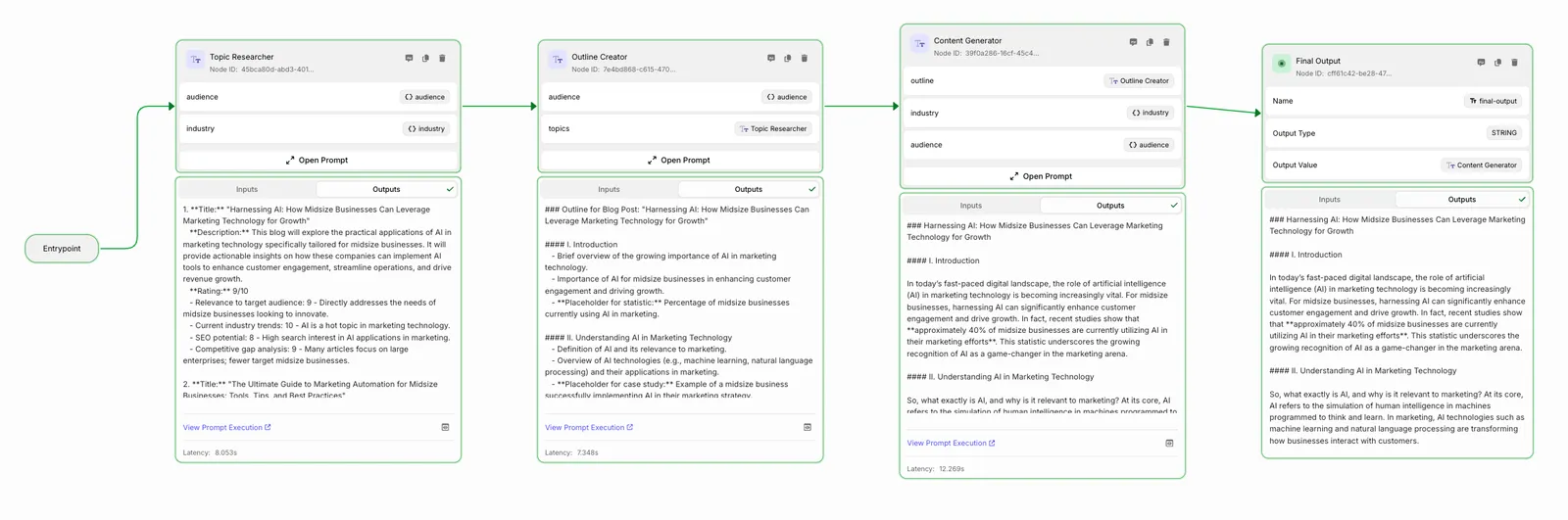
In this example, we’ll build a blog content generation Workflow that creates engaging, targeted content through a series of prompts. The Workflow takes an industry and target audience as inputs and produces a complete blog post through the following steps:

  1. TopicResearch: Generates and rates potential blog topics based on audience relevance and SEO potential
  2. OutlineCreation: Creates a detailed outline for the highest-rated topic
  3. ContentGeneration: Writes a complete blog post following the outline
  4. FinalOutput: Returns the final blog content
workflow.py
## Graph Definition
class Workflow(BaseWorkflow[Inputs, BaseState]):
graph = TopicResearch >> OutlineCreation >> ContentGeneration >> FinalOutput
class Outputs(BaseWorkflow.Outputs):
final_output = FinalOutput.Outputs.value
## Running it
workflow = Workflow()
terminal_event = workflow.run(
inputs=Inputs(
audience="Working professionals targeting midsize businesses",
industry="Marketing Technology"
)
)
## Output:
print(terminal_event.outputs.final_output)
"""
[Output will be a complete blog post tailored to the specified industry and audience]
"""

Which corresponds to a Workflow graph like this:
Basic Prompt Chain

Setup

Install Vellum

pip install vellum-ai

Create your Project

Structure your project like this:

basic_prompt_chain/
├── workflow.py
├── inputs.py
├── sandbox.py
├── __init__.py
└── nodes/
├── __init__.py
├── topic_research.py
├── outline_creation.py
├── content_generation.py
└── final_output.py

Define Workflow Inputs

inputs.py
from vellum.workflows.inputs import BaseInputs
class Inputs(BaseInputs):
audience: str
industry: str

The Workflow takes two inputs: the target audience and industry. These will be used to generate relevant, targeted content throughout the chain.

Build the Nodes

1

Topic Research

This node generates and rates potential blog topics based on the specified industry and audience.

nodes/topic_research.py
class TopicResearch(InlinePromptNode):
ml_model = "gpt-4o-mini"
blocks = [
ChatMessagePromptBlock(
chat_role="SYSTEM",
blocks=[
JinjaPromptBlock(
template="""\
You are a content strategist who identifies engaging blog topics for businesses to help boost their online presence and SEO performance.
You will suggest 3 blog topics for:
Industry: {{ industry }}
Target Audience: {{ audience }}
For each topic, provide:
1. A compelling title
2. A brief description of the angle
3. A rating from 1-10 with explanation
No preamble/postamble\
"""
)
],
),
]
prompt_inputs = {
"audience": Inputs.audience,
"industry": Inputs.industry,
}
2

Outline Creation

Takes the rated topics and creates a detailed outline for the highest-rated one.

nodes/outline_creation.py
class OutlineCreation(InlinePromptNode):
ml_model = "gpt-4o-mini"
blocks = [
ChatMessagePromptBlock(
chat_role="SYSTEM",
blocks=[
JinjaPromptBlock(
template="""\
You are a content outline specialist.
You will receive a list of <topics> with ratings to create a detailed outline targeted at {{ audience }}.
You will:
1. Select the highest-rated topic(s)
2. Create a detailed outline for a 1000-word blog post
3. Include sections for examples and actionable tips
4. Add placeholders for statistics or case studies
No preamble/postamble\
"""
)
],
),
]
prompt_inputs = {
"audience": Inputs.audience,
"topics": TopicResearch.Outputs.text,
}
3

Content Generation

Transforms the outline into a complete blog post.

nodes/content_generation.py
class ContentGeneration(InlinePromptNode):
ml_model = "gpt-4o-mini"
blocks = [
ChatMessagePromptBlock(
chat_role="SYSTEM",
blocks=[
JinjaPromptBlock(
template="""\
You are an expert content writer specializing in {{ industry }} for {{ audience }}.
Guidelines:
1. Select the highest-rated topic
2. Write in a conversational tone
3. Follow the outline exactly
4. Include examples and statistics
5. Break up text with subheadings
6. Target length: 600 words
7. Include introduction and call-to-action
No preamble/postamble\
"""
)
],
),
]
prompt_inputs = {
"outline": OutlineCreation.Outputs.text,
"industry": Inputs.industry,
"audience": Inputs.audience,
}
4

Final Output

Returns the generated content as the Workflow output.

nodes/final_output.py
class FinalOutput(FinalOutputNode[BaseState, str]):
class Outputs(FinalOutputNode.Outputs):
value = ContentGeneration.Outputs.text

Instantiate the Graph and Invoke it

1

Define the Graph and its Outputs

workflow.py
from vellum.workflows import BaseWorkflow
from vellum.workflows.state import BaseState
from .inputs import Inputs
from .nodes.topic_research import TopicResearch
from .nodes.outline_creation import OutlineCreation
from .nodes.content_generation import ContentGeneration
from .nodes.final_output import FinalOutput
class Workflow(BaseWorkflow[Inputs, BaseState]):
graph = TopicResearch >> OutlineCreation >> ContentGeneration >> FinalOutput
class Outputs(BaseWorkflow.Outputs):
final_output = FinalOutput.Outputs.value

You can output directly from the ContentGeneration node. Here we’ve used the FinalOutput node for clarity when pushed to the UI.

2

Instantiate the Workflow

## From any file / function from which you want to reference the Workflow
# Required import (the file imported from depends on your folder structure)
# from .workflow import Workflow
workflow = Workflow()
3

Invoke the Workflow

## From any file / function from which you want to run the Workflow
# Required imports (the file imported from depends on your folder structure)
# from .inputs import Inputs
terminal_event = workflow.run(
inputs=Inputs(
audience="Working professionals targeting midsize businesses",
industry="Marketing Technology"
)
)
## Get the generated content:
print(terminal_event.outputs.final_output)
"""
Example Output:
5 Essential MarTech Stack Optimization Strategies for 2024
In today's rapidly evolving business landscape, having an efficient marketing technology stack is no longer optional—it's crucial for success. As marketing professionals targeting midsize businesses, you need to ensure your MarTech investments deliver maximum ROI while staying within budget constraints...
[Rest of generated blog post content...]
"""

Conclusion

We’ve built a prompt chain Workflow that generates blog content through a series of specialized prompts. Each node in the chain builds upon the previous one’s output, resulting in high-quality, targeted content. From here, you can:

  • Version control the Workflow with your codebase
  • Continue development in the Vellum UI
  • Deploy to Vellum
  • Add evaluation metrics to assess content quality
  • Expand the chain with additional steps like SEO optimization or image generation