RAG Chatbot

In this example, we’ll build a basic RAG chatbot. The chatbot will be able to answer questions whose answers are grounded in the contents of PDF documents (in this case, Vellum’s Trust Center Policies). This is useful if you want to help scale your support team by finding them quick answers to common questions from customers.

Ultimately, we’ll end up with a Workflow that performs the following steps:

  1. ExtractUserMessage: extracts the most recent message from the user
  2. SearchNode: uses the user’s message to find relevant quotes from ingested PDFs
  3. FormatSearchResultsNode: reformats quotes to include the name of the document that they came from
  4. PromptNode: passes the user’s question and the PDF context to the LLM to answer the question
## Graph Definition
class BasicRAGWorkflow(BaseWorkflow[Inputs, BaseState]):
graph = ExtractUserMessage >> SearchNode >> FormatSearchResultsNode >> PromptNode
class Outputs(BaseWorkflow.Outputs):
result = PromptNode.Outputs.text
## Running it
workflow = BasicRAGWorkflow()
terminal_event = workflow.run(
inputs=Inputs(
chat_history=[
ChatMessageRequest(
role="USER",
text="How often is employee training?",
)
]
)
)
## Output:
print(terminal_event.outputs.result)
"""
Employee training, as outlined in the Information Security Policy
occurs on an annual basis. All new hires are required to complete
information security awareness training as part of their new employee
onboarding process and then annually thereafter. This ongoing training
includes security and privacy requirements, the correct use of
information assets and facilities, and, consistent with assigned roles
and responsibilities, incident response and contingency training.
Additionally, individuals responsible for supporting or writing code for
internet-facing applications or internal applications that handle customer
information must complete annual security training specific to secure coding
practices, which includes OWASP secure development principles and OWASP top 10
vulnerability awareness for the most recent year available.
Citation: Policy Information Security Policy - v1.pdf & Policy Software Development Life Cycle Policy - v1.pdf\
"""

Which corresponds to a Workflow graph like this:
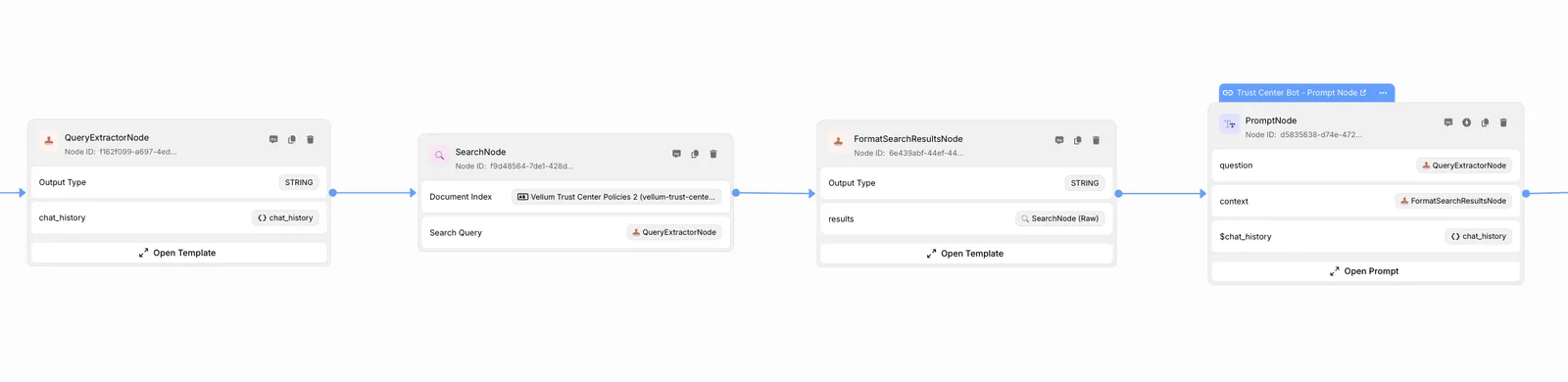
Basic RAG Chatbot

Let’s dive in!

Setup

Install Vellum

pip install vellum-ai

Create your Project

In this example, we’ll structure our project like this:

basic_rag_chatbot/
├── workflow.py
├── inputs.py
├── __init__.py
└── nodes/
├── __init__.py
├── extract_user_message.py
├── search_node.py
├── format_search_results_node.py
└── prompt_node.py

Folder structure matters! Vellum relies on this structure to convert between UI and code representations of the graph. If you don’t want to use the UI, you can use whatever folder structure you’d like.

Define Workflow Inputs

from typing import List
from vellum import ChatMessageRequest
from vellum.workflows.inputs import BaseInputs
class Inputs(BaseInputs):
chat_history: List[ChatMessageRequest]

Our chatbot will have a chat history, which is a full list of messages between the user and the bot. If we want, we could use this to answer follow-up questions with context from previous messages.

Build the Nodes

1

Extract User Message

We’ll use the output from this node in the next step— to search relevant documents to answer the user’s question factually.

# nodes/extract_user_message.py
from vellum.workflows.nodes import TemplatingNode
from ..inputs import Inputs
class ExtractUserMessage(TemplatingNode):
# Here, we reference the chat_history input that we've connected to this node.
template = """\
{{ chat_history[-1]["text"] }}\
"""
# Here, we define the inputs to _this_ node.
inputs = {
"chat_history": Inputs.chat_history,
}

You can see that we’re subclassing the TemplatingNode class, which allows us to use a Jinja template to extract the user’s query from the chat history.

2

Search Node

Specify which document index to search over, and use the user’s query to find relevant chunks of information.

# nodes/search_node.py
from vellum.workflows.nodes import BaseSearchNode
from .extract_user_message import ExtractUserMessage
class SearchNode(BaseSearchNode):
document_index = "vellum-trust-center-policies"
query = ExtractUserMessage.Outputs.result

Here, we subclass BaseSearchNode, which allows us to specify a document index to search over, and a query to search with. Vellum provides out-of-the-box, scalable vector database and embeddings solutions that make this easy.

3

Format Search Results Node

This is an optional step, but it can be useful to format the search results in a way that’s optimal for an LLM to consume. You may want to include metadata in a certain format or omit it altogether. Here, we include the name of the document that each chunk came from, so that we can later instruct an LLM to cite its sources.

# nodes/format_search_results_node.py
from vellum.workflows.nodes import TemplatingNode
from .search_node import SearchNode
class FormatSearchResultsNode(TemplatingNode):
template = """\
{% for result in results -%}
Policy: {{ result.document.label }}
------
{{ result.text }}
{% if not loop.last %}
#####
{% endif -%}
{% endfor %}\
"""
inputs = {
"results": SearchNode.Outputs.results,
}
4

Use an LLM to Answer the User’s Question

Pass the user’s question and the answer context to the LLM so the LLM can answer in a personalized manner for the user.

# nodes/prompt_node.py
from vellum.workflows.nodes import InlinePromptNode
from vellum import (
ChatMessagePromptBlock,
JinjaPromptBlock,
)
from .extract_user_message import ExtractUserMessage
from .format_search_results_node import FormatSearchResultsNode
class PromptNode(InlinePromptNode):
ml_model = "gpt-4o"
prompt_inputs = {
"question": ExtractUserMessage.Outputs.result,
"context": FormatSearchResultsNode.Outputs.result,
}
blocks = [
ChatMessagePromptBlock(
chat_role="SYSTEM",
blocks=[
JinjaPromptBlock(
block_type="JINJA",
template="""\
Answer user question based on the context provided below, if you don't know the answer say "Sorry I don't know"
**Context**
``
{{ context }}
``
Limit your answer to 250 words and provide a citation at the end of your answer\
""",
),
],
),
ChatMessagePromptBlock(
chat_role="USER",
blocks=[
JinjaPromptBlock(
block_type="JINJA",
template="""\
{{ question }}\
""",
),
],
),
]

Instantiate the Graph and Invoke it

1

Define the Graph and its Outputs

# workflow.py
from vellum.workflows import BaseWorkflow
from vellum.workflows.state import BaseState
from .inputs import Inputs
from .nodes.extract_user_message import ExtractUserMessage
from .nodes.search_node import SearchNode
from .nodes.format_search_results_node import FormatSearchResultsNode
from .nodes.prompt_node import PromptNode
class BasicRAGWorkflow(BaseWorkflow[Inputs, BaseState]):
graph = ExtractUserMessage >> SearchNode >> FormatSearchResultsNode >> PromptNode
class Outputs(BaseWorkflow.Outputs):
result = PromptNode.Outputs.text
2

Running the Workflow

Using the Sandbox Runner

The sandbox runner is ideal for testing and development. It enables you to execute the workflow locally using sample inputs, providing a quick way to validate functionality.

You can run the sandbox runner by running the following command: python -m basic_rag_chatbot.sandbox 0 (where 0 is the index of the Scenario you want to run).

# sandbox.py
from vellum import ChatMessage
from vellum.workflows.sandbox import WorkflowSandboxRunner
from .inputs import Inputs
from .workflow import BasicRAGWorkflow
if __name__ != "__main__":
raise Exception("This file is not meant to be imported")
runner = WorkflowSandboxRunner(
workflow=BasicRAGWorkflow(),
inputs=[
Inputs(
chat_history=[
ChatMessage(
role="USER",
text="How often is employee training?",
)
]
),
],
)
runner.run()
"""
Example Output Final Lines:
2025-01-22 22:48:38,256 - vellum.workflows - INFO - result: Employee training is conducted annually. All new hires are required to complete information security awareness training as part of their onboarding process and annually thereafter. Additionally, incident response and contingency training is provided annually. Employees must also acknowledge their understanding of the Information Security Program upon hire and annually. For those involved in software development, annual security training specific to secure coding practices is required.
"""
3

Integration into a Project

Instantiate the Workflow

## From any file / function from which you want to reference the Workflow
# Required import (the file imported from depends on your folder structure)
# from .workflow import BasicRAGWorkflow
workflow = BasicRAGWorkflow()

Invoke the Workflow and Output the Answer

## From any file / function from which you want to run the Workflow
# Required imports (the file imported from depends on your folder structure)
# from .inputs import Inputs
# from vellum import ChatMessageRequest
terminal_event = workflow.run(
inputs=Inputs(
chat_history=[
ChatMessageRequest(
role="USER",
text="How often is employee training??",
)
]
)
)
## Output:
print(terminal_event.outputs.result)
"""
Employee training, as outlined in the Information Security Policy
occurs on an annual basis. All new hires are required to complete
information security awareness training as part of their new employee
onboarding process and then annually thereafter. This ongoing training
includes security and privacy requirements, the correct use of
information assets and facilities, and, consistent with assigned roles
and responsibilities, incident response and contingency training.
Additionally, individuals responsible for supporting or writing code for
internet-facing applications or internal applications that handle customer
information must complete annual security training specific to secure coding
practices, which includes OWASP secure development principles and OWASP top 10
vulnerability awareness for the most recent year available.
Citation: Policy Information Security Policy - v1.pdf & Policy Software Development Life Cycle Policy - v1.pdf\
"""

Conclusion

In under 120 lines of code, we built a RAG chatbot that can answer users’ questions with context from a vector database. Looking forward, we can:

  • Version control the graph with the rest of our project in a git repository
  • Continue building the graph in the Vellum UI
  • Evaluate the pipeline with test data, see Evaluating RAG Pipelines
  • Host it on our own servers or deploy to Vellum